From the desk
The Four Meters: How No-Code App Builders Actually Charge
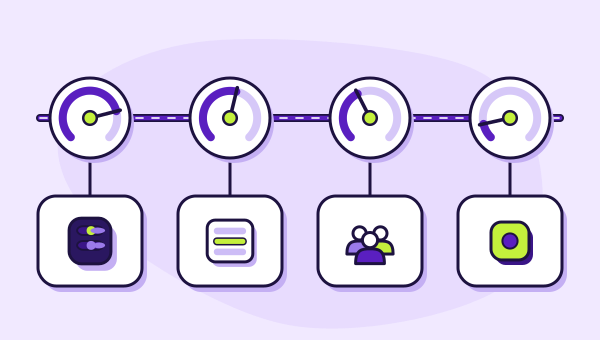
Workload, updates, people, published apps. Four meters, four different definitions of an expensive app, and one reason comparing headline prices tells you almost nothing.
On this page 7 sections
Software you buy per seat is easy to budget. You count the people, multiply, and you are done for the year. Almost nothing in the no-code app category works that way, and that is the single largest source of unpleasant surprises in it.
Three of the four platforms we cover meter something other than headcount. Each has picked a different thing to count, and each choice encodes a different theory about what makes an application expensive to run. Understanding those four theories is more useful than any price comparison, because the meter is what determines whether your particular app is cheap or ruinous on a given platform. It is also how we sort our best no-code app builders shortlist.
Four meters, four things counted
- BubbleCounts: Workload unitspage loads, workflows, searches and bulk operations
- GlideCounts: Updates — changed rowsreads, filters and building are free
- SoftrCounts: People with a loginbuilders, team users, client users
- AdaloCounts: Published appsno usage-based charges; unlimited app actions
Meter one: server workload
Bubble bills in workload units. Its documentation describes workload as the server resources needed to host, run and scale an app, aggregated across page loads, workflows, searches and bulk operations, and measured in those units.
The theory here is that the cost of running software is the work the servers do, which is true and is exactly how the infrastructure underneath every platform in this category is billed. Bubble has simply passed that model through to you instead of absorbing it.
The consequence is that the efficiency of your build is a line item. Two implementations of the same feature can consume very different amounts of workload depending on whether the database does the filtering or the page does. Neither looks different to the person using the app. One costs more every time the screen opens, forever.
Bubble publishes no per-action price list. There is no table saying what a search costs. This is defensible — the honest answer genuinely is that it depends — but it means you cannot model your bill before you build. You build, you run, you read the meter. Anything more specific is unpicked in what a Bubble workload unit is.
Meter two: changed rows
Glide bills in updates, and documents the principle as roughly one update per changed row. Reads are free. Filters, visibility conditions and building in the editor are free. Writing is the billable event.
The theory is that displaying data is cheap and changing it is not — specifically because a change has to be propagated, synced and reconciled across whatever is downstream. That is a reasonable model and it produces a very clear rule of thumb: look-ups are cheap, data entry is expensive.
There is one crucial qualifier. Glide documents that user-triggered actions on its own tables consume no updates, while the same action against an external data source does. So the meter is not simply "writes"; it is "writes that cross a boundary". Where your data lives is therefore a pricing decision as much as a technical one, which is the sort of thing that belongs on a pricing page and is instead in the docs. The detail is in what Glide counts as an update.
Meter three: people
Softr bills per user, split into builders, team users and client users, with published prices for each additional head.
The theory is the traditional one, and it is the only meter here you can forecast from a standing start. You know how many customers you intend to give logins to. Multiply. Done. In a category defined by unpredictability, that is a real product feature and it is why Softr scores as well as it does despite a lower ceiling than Bubble.
The cost of per-user pricing is that it is exactly wrong for a public audience. Anything anybody can sign up for has an unbounded user count, and an unbounded user count against a per-user meter is not a budget, it is a hope. Per-user pricing also steps rather than slopes: plans include an allowance, the allowance runs out, and the next plan is not ten percent more expensive. What an app user costs on Softr does the arithmetic on where those steps land.
Meter four: published apps
Adalo charges per published app and states on its pricing page that there are no usage-based charges, with unlimited app actions on every tier.
The theory is that the platform's cost is the act of distribution, not the traffic. Whether your app is used by fifty people or fifty thousand, you occupy one slot.
This is the friendliest meter for anything consumer-facing and the least friendly for an agency or a product studio, because every additional app is another slot and the tiers ration slots tightly. It also removes an entire category of anxiety from launching, which is worth more than it sounds. The trade is capability: the platform that has removed the meter is also the platform with the lowest ceiling, and that is not a coincidence so much as a matching of audience.
Why headline prices mislead
Put the entry-level paid prices side by side and you get a list that is worse than useless, because the numbers measure different things.
An app with forty readers and two writers is cheap on the update meter and expensive on the per-user meter. Reverse the ratio and the answer reverses too. An app with immense traffic and trivial logic is free of charge on the published-app meter and potentially alarming on the workload meter. A complex internal tool used by six people is comfortable on almost any of them.
The only comparison that means anything is: for the shape of app I am building, which meter moves least? That question can be answered before you write a line of configuration, and it will tell you more than a fortnight of feature evaluation.
Three habits that protect you
Whatever meter you end up on, three things reliably prevent the bad outcome.
- Find the usage panel on day one. Every one of these platforms exposes consumption somewhere. Look at it weekly during the first month, when the numbers are small enough to understand and changes are cheap to make.
- Decide the cap policy deliberately. Bubble lets you disable overages so the app stops rather than the invoice growing. Glide publishes an overage rate of $0.02 per update over quota where unlimited updates are enabled. Both are decisions with consequences; make them on purpose rather than by default.
- Model the step, not the slope. Usage pricing feels continuous and behaves discontinuously. What you actually need to know is the point where the next plan begins, how far away it is, and what triggers it. Growth rarely hurts gradually; it hurts at the boundary.
A note on numbers nobody has
You will find articles asserting that a typical app on one of these platforms costs some specific amount a month. Treat every one of them as fiction unless it says whose app.
The vendors do not publish consumption benchmarks. Bubble's own wording is that most users find their plan has more than enough workload to get started — a sentence about getting started, not about running at scale. Glide ties the cost of an update to where the row being changed happens to live. Neither will tell you what your app will draw, because neither can.
That absence is not a scandal; it is an accurate reflection of a genuinely app-specific cost. What is a scandal is filling the gap with an invented figure, which is why you will not find one on this site.
Common questions about no-code pricing
Why do no-code platforms use usage pricing at all?
Which meter is cheapest overall?
Can I get a firm quote before building?
What happens if I go over my allowance?
Connects to
Everything on this desk feeds one comparison: the best no-code app builders, ranked by which meter suits which shape of application.