From the desk
Softr Review (2026): You Pay for People, Not for Usage
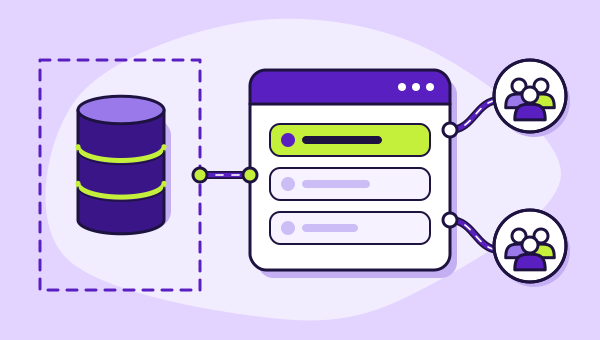
Softr never holds your data, which makes it the only platform here you can price exactly before you build — and the only one you can leave without losing your records.
On this page 7 sections
Softr is the outlier in this category and the reason is architectural rather than cosmetic. It is not a database with an interface attached. It is an interface that attaches to a database you already keep somewhere else — Airtable, Google Sheets, Notion, HubSpot, Salesforce, monday.com, SmartSuite, ClickUp, Xano, Supabase, BigQuery, a SQL server, or a REST API.
That single decision shapes everything below it, including one of only two genuinely forecastable bills on our best no-code app builders shortlist. Softr does not meter what your app does. It meters how many people can log in.
The pricing, as Softr documents it
Softr's marketing pricing page renders in JavaScript and would not give up its table on our pass, so the figures below come from Softr's own help documentation instead. That provenance is worth stating, because third-party price trackers for this product disagree with each other quite badly.
The documented tiers: Free gives up to three builders and five users with no split between staff and clients. Basic is $19 a month billed annually, $25 monthly, with one builder, five team users and five client users. Pro is $99 annually, $119 monthly, with two builders, ten team users expandable to fifty, and fifty client users expandable to 250. Business is $329 annually, $395 monthly, with three builders, thirty team users expandable to a hundred and a hundred client users expandable to 500. Enterprise is quoted on request.
Extra users are bought individually and Softr publishes the rates: on Pro, $3 per additional team user and $1 per additional client user; on Business, $5 and $2 respectively. Softr also documents that extra users are billed monthly even if the base plan is annual, which is a small detail that quietly changes annual-vs-monthly arithmetic.
Who each plan lets in
Basic$19/mo annually1 builder
Team users5Client users5Pro$99/mo annually2 builders
Team users10 → 50 · $3 eachClient users50 → 250 · $1 eachBusiness$329/mo annually3 builders
Team users30 → 100 · $5 eachClient users100 → 500 · $2 each
Three kinds of user, and why the distinction costs money
Softr splits humans into builders, team users and client users, and the split is the pricing model rather than a technicality.
A builder can edit the application. A team user is internal staff with a login. A client user is somebody outside your organisation — the customer, the supplier, the member. Client users are the cheapest per head and the most numerous, which is the correct shape for a portal.
The trap sits at the boundaries. Basic includes five client users. The sixth client does not cost $1; it costs a move to Pro, which is a fivefold increase on the base plan. That step is the single most consequential number in Softr's price list, and it arrives at a point — your sixth customer — that most people hit early and none plan for. The arithmetic is laid out in what an app user costs on Softr.
The portability argument, which is real
Every other platform in this category holds your records. Softr does not, and that changes what leaving means.
If you abandon Softr tomorrow, your Airtable base is still an Airtable base. Your Postgres instance is untouched. Your Google Sheet still opens. What you lose is the interface layer: the screens, the user groups, the permission rules, the branded login. That is a real loss and it took real work, but it is a fraction of what leaving a platform that owns your database costs you.
This is the strongest structural argument any tool on this desk can make, and it deserves to be weighed against Softr's lower ceiling rather than dismissed as a technicality. We compare all four vendors on this in getting your app out.
Where Softr stops
Softr is a front end. It does lists, detail views, forms, permissions, charts, and conditional visibility — competently. What it does not do is deep procedural logic, because the logic is supposed to live in your data layer or in an automation tool sitting beside it.
If your requirement contains a sentence like "when the second approver signs off, recalculate the tier discount and notify the regional manager", Softr is not where that sentence gets implemented. It may still be where the approver sees the request; the rule itself belongs upstream in your database, your automation platform or your own code.
That division is clean and defensible, and it also means the real total cost of a Softr build sometimes includes a second subscription somewhere else. Count that before comparing headline prices.
What you inherit from your data source
Because Softr reads from somewhere else, some of its behaviour is not really its own. A screen backed by a large Airtable base behaves differently from the same screen backed by a Postgres table, and a rate limit on the source becomes a slow list in the app.
This cuts both ways and the good side is underrated. Choosing a proper database as the source gives you indexes, constraints and backups that no no-code platform provides, and Softr will happily sit on top of it. Choosing a spreadsheet gives you a system anybody in the office can edit, with all the consequences that implies for an interface that assumes the columns will stay where they are.
Either way, the source is a decision with as much weight as the platform. Evaluate Softr and your data layer as one purchase, because that is how they will behave.
The audience question decides everything
Softr's meter is people, so the viability of Softr is entirely a question of how many people and whether you know the number.
Twenty-five named clients, each with their own documents and status: Softr is comfortably the best option in this category. Two hundred named clients: still good, still a Pro plan at $249 a month, and close enough to Pro's 250 ceiling to model the Business step against a flat-fee alternative now. An unknown public audience that might be five hundred people or five thousand: the wrong tool, unambiguously, and no amount of feature comparison changes that.
The verdict, expanded
Softr scores highly for two reasons that have nothing to do with features. Its bill is calculable in advance, which is unique here. And its architecture means the worst-case outcome of choosing it is a rebuilt interface rather than a lost business.
It is held back by the steepness of its steps and by the ceiling that comes with being a front end. Neither is a defect; both are consequences of the design, and both are the sort of thing a buyer should meet in a review rather than in month four.
If you are building a portal for people you can name, start here and only move on if something specific stops you. If you are building for an audience you cannot count, start somewhere else.
Connects to
Everything on this desk feeds one comparison: the best no-code app builders, ranked by which meter suits which shape of application.